Configuring HTTPS with a reverse proxy using pfSense
Created: April 12, 2025 | Modified: January 18, 2026
Introduction
Most HTTPS guides cover one piece of the puzzle, and the rest are 20-minute YouTube videos. I wrote this because I needed documentation that covered the whole thing in one place. Friends found it useful, so here it is.
If something is unclear, let me know and I'll fix it.
This guide uses pfSense with HAProxy as the implementation example, but the architecture applies to any reverse proxy (nginx, Caddy, Traefik). You'll need familiarity with DNS records and your reverse proxy's configuration interface.
Implementation stack: pfSense CE 2.7.2, HAProxy 0.63_2, ACME 0.9.1. Any reverse proxy capable of SSL termination, HTTP-to-HTTPS redirects, and SNI-based routing can replace HAProxy. Certificate management can be handled by Certbot, the ACME package, or your reverse proxy's built-in tooling.
- pfSense: https://docs.netgate.com/pfsense/en/latest/
- HAProxy: https://docs.netgate.com/pfsense/en/latest/packages/haproxy.html
- ACME: https://docs.netgate.com/pfsense/en/latest/packages/acme/index.html
- (Optional/Recommended) Cloudflare: https://www.cloudflare.com/en-ca/plans/free/
Traffic flow
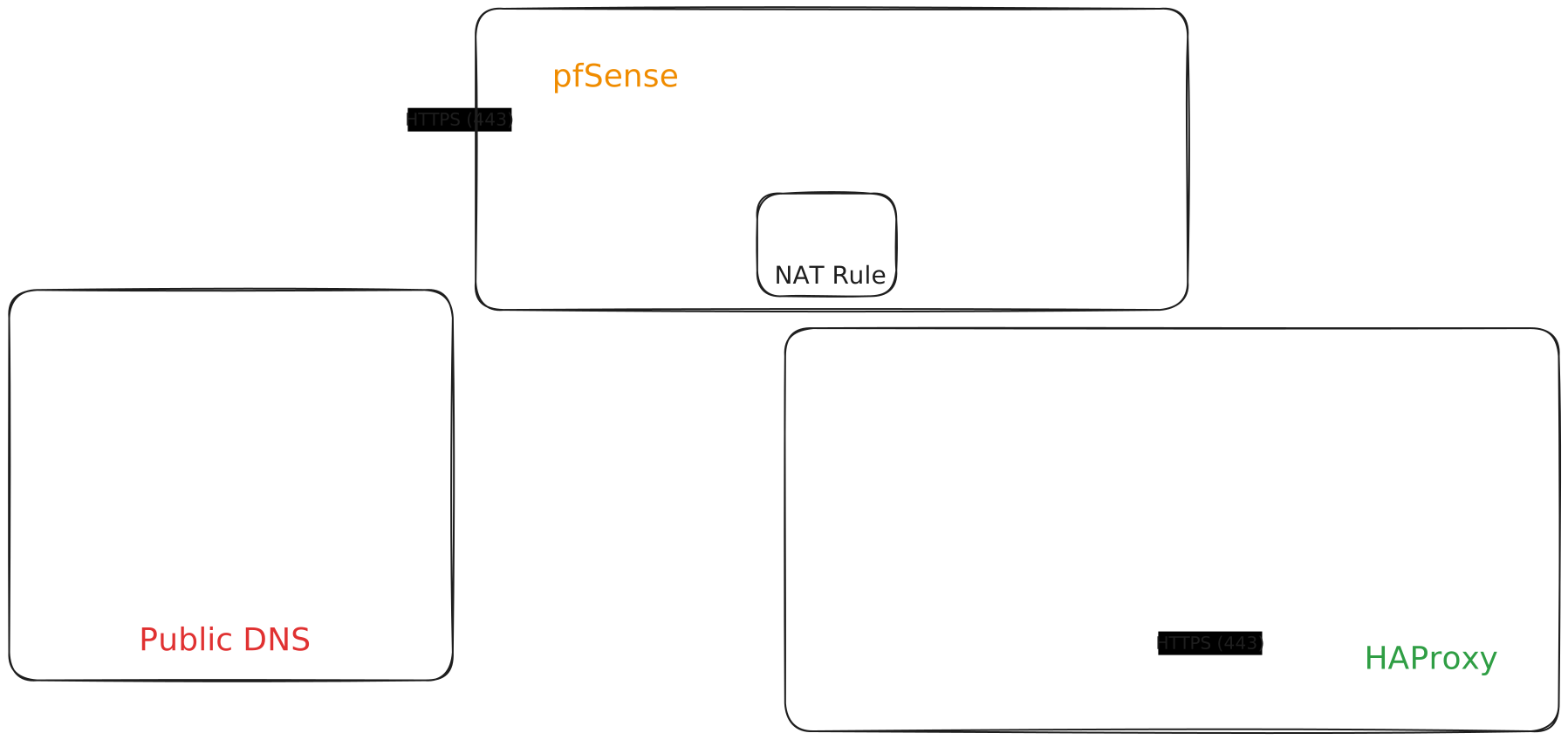
This diagram covers what's configured in this guide, not a complete technical reference.
Regardless of which reverse proxy you use, the architecture is the same: public traffic hits the proxy first. The proxy handles SSL termination, inspects the request, and forwards it to the appropriate internal service. Your backend services never need to manage their own certificates or be directly internet-facing.
Public DNS records
Set public DNS records to point at host
This is required for Let's Encrypt certificate generation. Allow time for DNS propagation.
Let's Encrypt (and any ACME-based CA) needs to verify you control the domain before issuing a certificate. Your DNS A/AAAA records must point to your public IP, or you must use a DNS challenge (covered below). Certificate issuance will fail without this.
Set up DDoS protection via Cloudflare
Cloudflare's free plan handles DDoS protection well enough for most self-hosted setups. Upgrade if you outgrow it.
SSL certificate
Let's Encrypt certificates expire every 90 days. Configure automated renewal from the start - manual renewal is how you discover your site is down on a Saturday. Caddy, Traefik, cert-manager, Certbot with a cron job, and pfSense's ACME package all handle this.
These instructions use the ACME package on pfSense. You can also manually import a certificate via System > Certificates.
Use a DNS challenge for your certificate. It's better than the older HTTP-01 method in most self-hosted scenarios. See Let's Encrypt challenge types for details.
Two validation methods: the DNS-01 challenge validates domain ownership via a TXT record in your DNS zone (works even if port 80 is blocked, required for wildcard certificates). The HTTP-01 challenge validates by placing a file at http://yourdomain/.well-known/acme-challenge/. DNS challenge is generally preferable for self-hosted setups.
If certificate issuance fails, check Let's Debug.
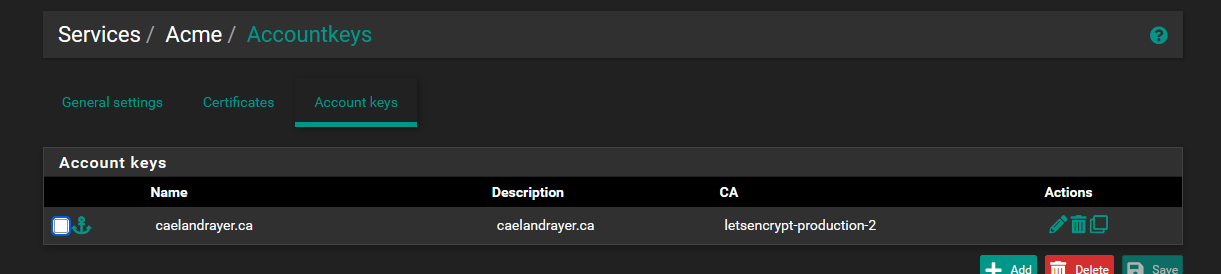
Set up account key
Let's Encrypt uses this to identify who's requesting a certificate.
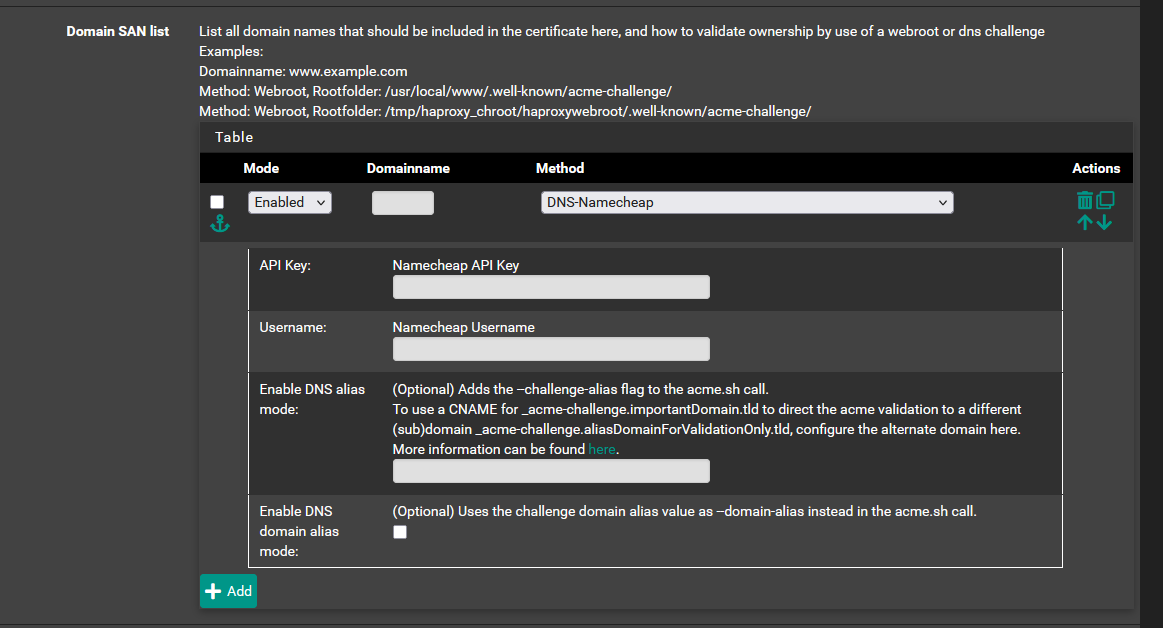
Create SSL certificate request template
Using Namecheap as an example here. Fill in the fields to create your certificate template. You'll probably need an API key from your DNS registrar.
Issue a certificate
Hit Issue/Renew. Check the "Last renewed" column to confirm it worked. This can take a minute, so move on and check back.

Network configuration
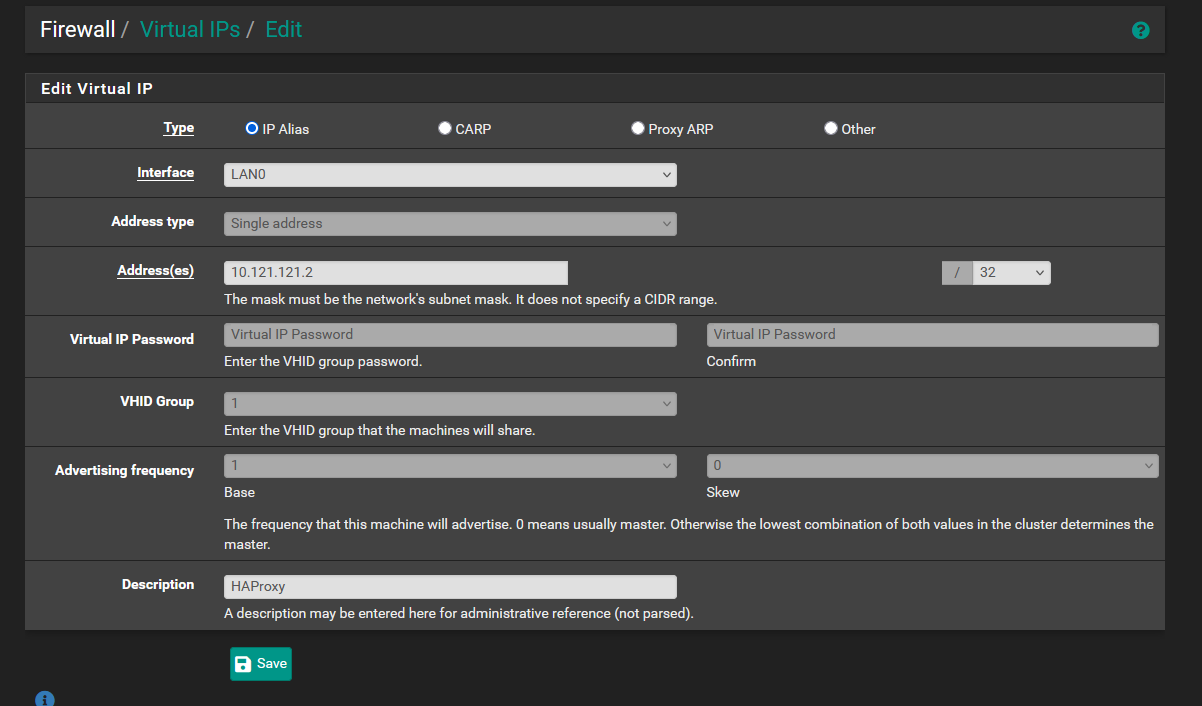
Your reverse proxy needs a stable address to listen on. In pfSense this is a virtual IP; in a cloud or Linux environment it might be a dedicated interface, a loopback address, or the server's primary IP. Ports 80 and 443 must be forwarded to this address from your public WAN interface.
Create a virtual IP
(pfSense/HAProxy specific) This is the address HAProxy will listen to for requests. This virtual IP acts as a loop-back target.
Create NAT rules and port forwards
THIS STEP WILL OPEN YOUR WAN ADDRESS TO INCOMING TRAFFIC BY DEFAULT:

The GUI defaults to "Add associated filter rule," so forwarding a port also creates a firewall rule to pass that traffic.
Create port forwards for 80 and 443, both pointing to the virtual IP you set up above.
If a user types "caelandrayer.ca" into a browser, it may default to HTTP. End users are unlikely to understand this behavior and may believe the site is down or broken. Redirecting ensures that no matter how users access your site, they reach the right place.
While less common now, some API and SEO aspects would also be impacted.
To mitigate this risk, use HSTS (HTTP Strict Transport Security):
We configure this in the HTTPS backend actions below.
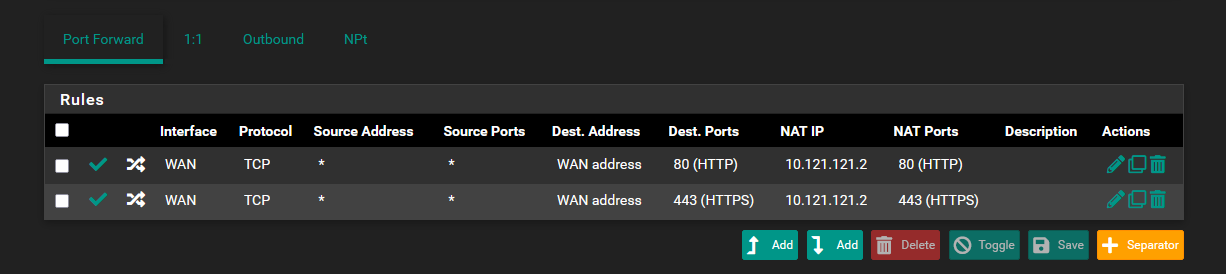
This auto-generates two filter rules on the WAN interface:

Set up DNS resolver domain/host overrides
(pfSense/HAProxy specific) This makes sure internal DNS resolves to the virtual IP where HAProxy listens. Set the lookup server IP to the virtual IP you configured earlier.

(Some setups don't need this, but if you skip it, other parts of the guide won't apply directly.)
When internal services try to reach a domain that points publicly to your WAN IP, they may fail due to NAT hairpinning. The fix - split-horizon DNS - makes internal DNS resolve that domain to the proxy's internal address instead. In pfSense this is a DNS resolver override; elsewhere it might be a /etc/hosts entry, a Pi-hole custom record, or a split-view DNS zone.
HAProxy configuration
Most reverse proxies organize configuration into two pieces: where traffic comes in (the "frontend" or "listener"), and where it goes (the "backend" or "upstream"). HAProxy calls them backends and frontends; nginx uses server blocks and upstream; Caddy uses reverse_proxy directives; Traefik uses routers and services. Same concept, different vocabulary.
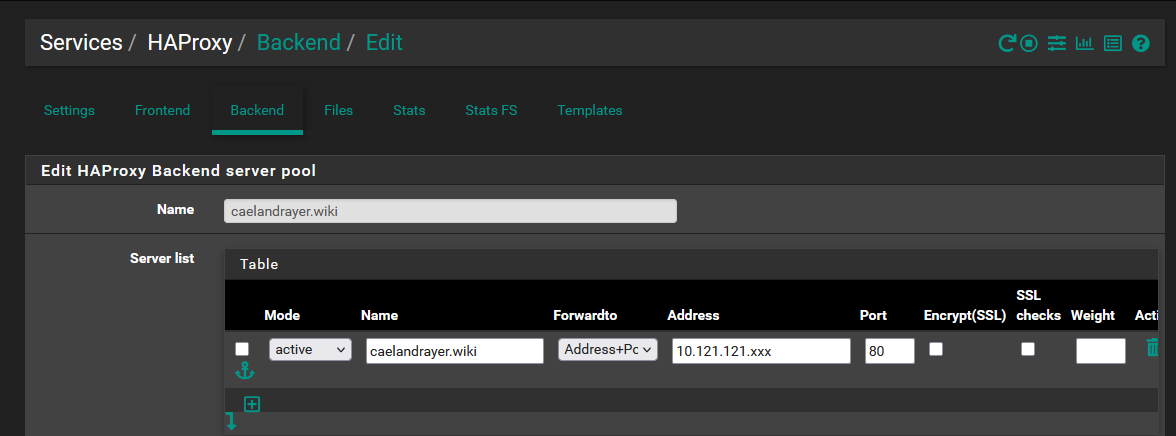
Create HAProxy backend
The backend tells HAProxy where to forward traffic.
- Name: Descriptive only, pick whatever makes sense to you
- Address: LAN/local IP of the service
- Port: Port the service listens on
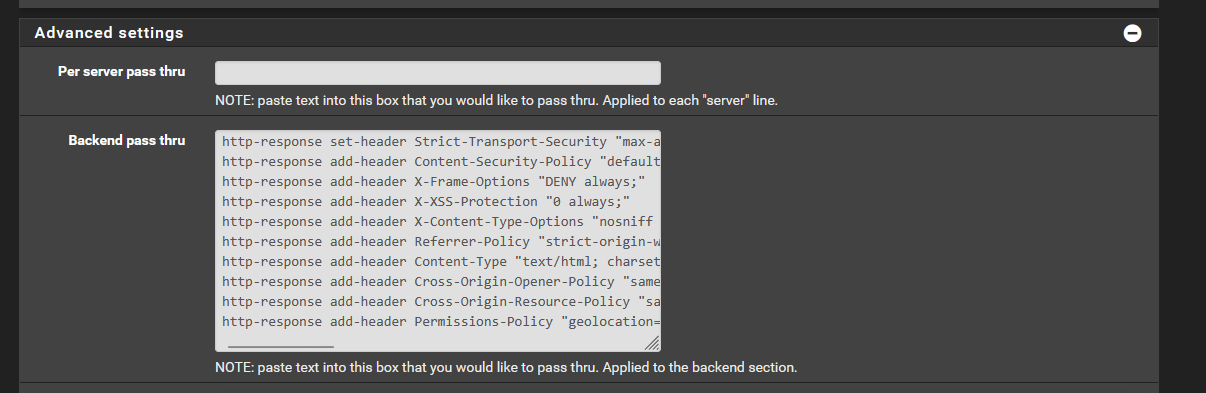
In advanced settings, set up HSTS and security headers.
http-response set-header Strict-Transport-Security "max-age=31536000; includeSubDomains; preload"
http-response add-header Content-Security-Policy "default-src 'self'; script-src 'self'; connect-src 'self'; img-src 'self'; style-src 'self'; frame-ancestors 'self'; form-action 'self'; base-uri 'none'"
http-response add-header X-Frame-Options "DENY"
http-response add-header X-XSS-Protection "0"
## Do NOT add a blanket Content-Type header here -- it would override correct
## Content-Types for CSS, JS, images, and JSON responses served through this backend.
http-response add-header X-Content-Type-Options "nosniff"
http-response add-header Referrer-Policy "strict-origin-when-cross-origin"
http-response add-header Cross-Origin-Opener-Policy "same-origin"
http-response add-header Cross-Origin-Embedder-Policy "same-site"
http-response add-header Cross-Origin-Resource-Policy "same-site"
http-response add-header Permissions-Policy "geolocation=(), camera=(), microphone=()"
These response headers are standardized HTTP - the names and values are identical regardless of which proxy you use. Only the syntax differs: nginx uses add_header, Caddy uses header, Traefik uses middleware.
Different sites may require different settings.
Configure HAProxy HTTP frontend to redirect to HTTPS
This frontend listens on the virtual IP for HTTP (port 80) traffic:
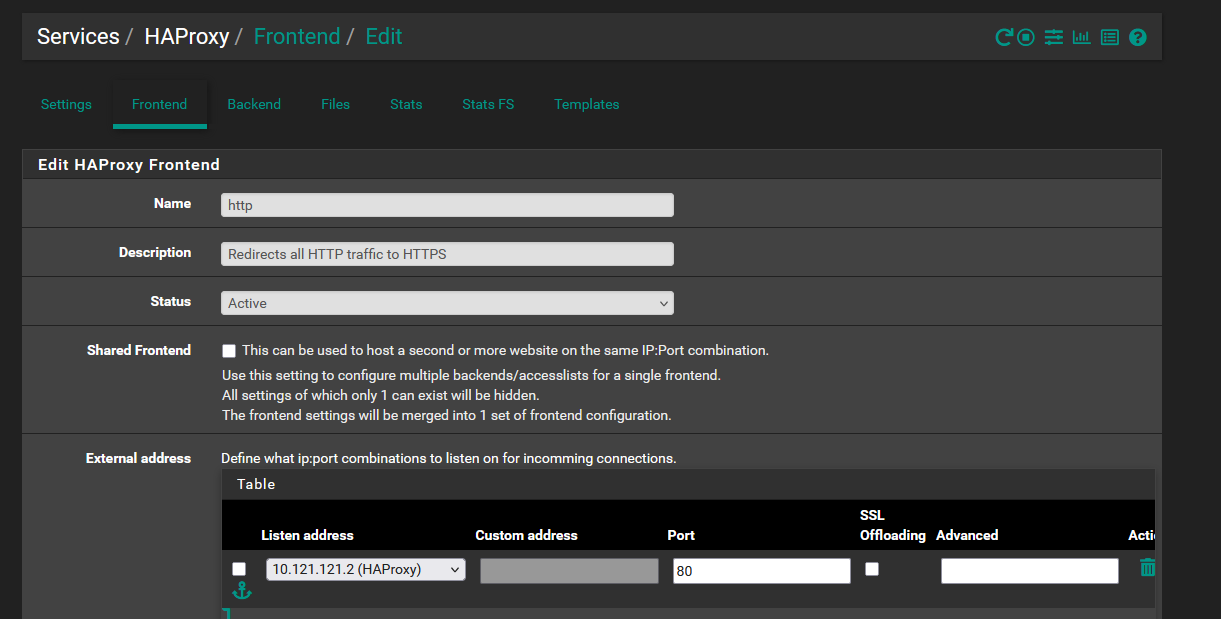
Configure an action to redirect traffic to HTTPS:

What each setting does:
scheme https: Redirect to HTTPScode 301: Permanent redirect (browser caches it)unless { ssl_fc }: Skip if already HTTPS (prevents redirect loops)
Read more about HTTP to HTTPS redirects
Every reverse proxy handles this differently. In nginx: return 301 https://$host$request_uri;. In Caddy, it's automatic. In Traefik, use an http entrypoint with a redirectscheme middleware. The 301 tells browsers to cache the redirect.
Configure HAProxy HTTPS frontend
This frontend handles HTTPS traffic. Point it at the virtual IP and enable SSL offloading.
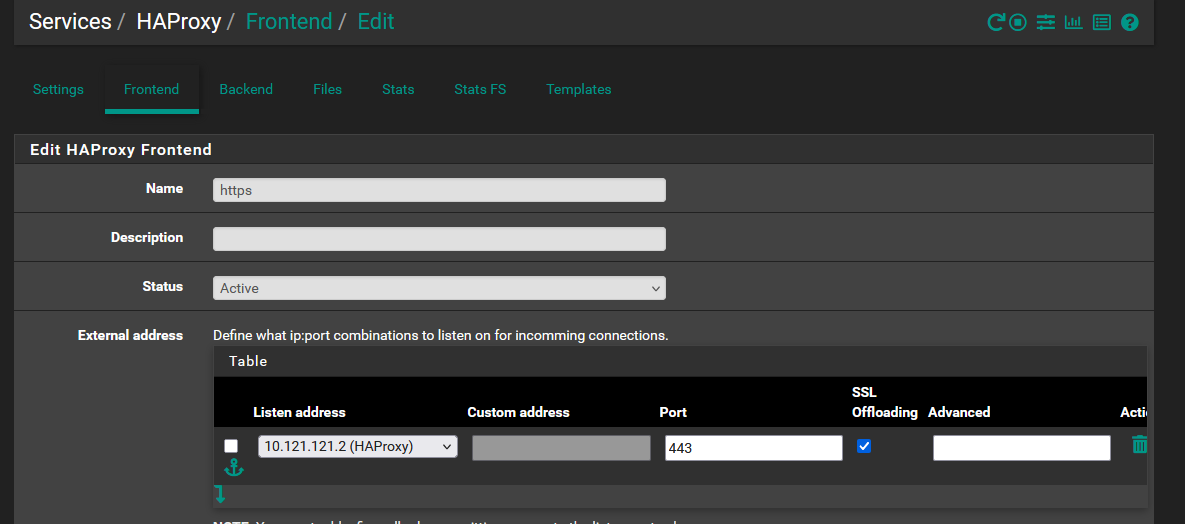
Set up an Access Control List (ACL). ACLs "tag" traffic so you can route it to the right backend.

Create an action for that ACL. The ACL rule name and "Condition acl names" field must match exactly. Here, matching traffic goes to the "caelandrayer.ca" backend.

When a single proxy handles multiple domains, it reads the hostname from the TLS handshake (SNI) or the HTTP Host header and routes to the right backend. HAProxy calls these ACLs; nginx uses server_name; Caddy and Traefik match on hostname in the site block or router rule.
Optional, but recommended:

Without this, your backend sees the proxy's IP on every request, not the client's. The X-Forwarded-For header preserves the real client IP for logging. Most reverse proxies add this automatically or via a configuration toggle.
Pick the primary certificate for SSL offloading:
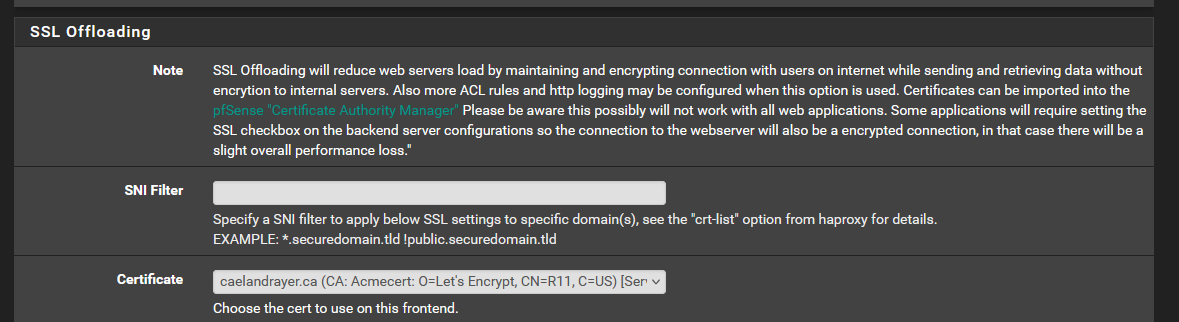
SSL termination means the proxy decrypts HTTPS and forwards plain HTTP to your backend. Your internal services don't need certificates. The alternative - SSL passthrough - forwards encrypted traffic directly to the backend, which then needs its own certificate and gives up the proxy's ability to inspect or modify requests. Termination at the proxy is the standard approach.

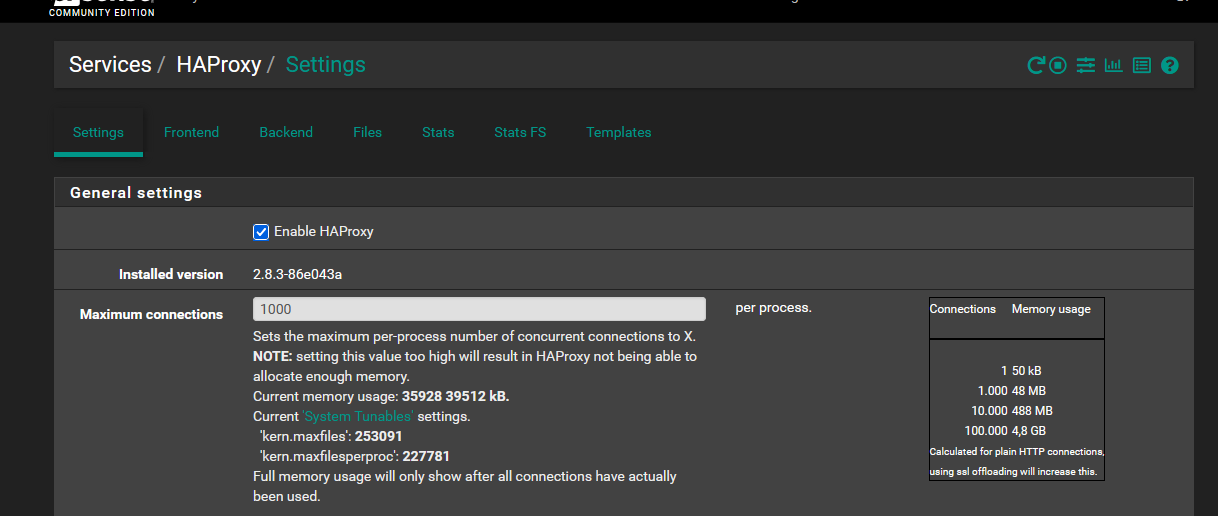
Enable HAProxy
Make sure HAProxy is enabled. Set "Maximum connections" to something reasonable for your hardware.
Testing
Check two things:
- Does HTTP redirect to HTTPS?
- Is the certificate valid?
Once that works, test from outside your network:
- Scan with Mozilla Observatory
- Submit to HSTS preload
Troubleshooting
Certificate issuance fails. Check that your DNS A record points to your public IP and has propagated (use dig or DNS Checker). If using a DNS challenge, verify your API key and that the TXT record is being created. Let's Debug will diagnose most ACME failures.
502 Bad Gateway or connection refused. HAProxy is running but cannot reach the backend service. Verify the backend IP and port are correct, and that the service is actually listening. Check HAProxy stats page if enabled.
Site loads over HTTPS but shows certificate warnings. The wrong certificate is being served - check that the certificate in your HTTPS frontend matches the domain being accessed. If you have multiple domains, verify the additional certificates list.
Internal clients cannot reach the site. DNS hairpinning issue. Confirm your DNS resolver override (or split-horizon DNS) points the domain to the virtual IP internally, not the public WAN IP.
Security headers breaking the site. Open browser DevTools (F12), check the Console tab for CSP violations, and adjust the Content-Security-Policy header in your backend configuration. Start permissive and tighten.
Next Steps
At this point you have a working reverse proxy with automated certificate renewal and security headers. From here: add backends for additional services, tighten your CSP per-site, and monitor certificate expiry through the ACME package dashboard.